The TiviMate downloader code is 272483
Type 272483 into the Downloader app and it pulls the official TiviMate APK straight onto your Fire Stick or Android TV box — no Amazon store, no computer, no sideloading tricks. Here’s exactly what the code does and how to use it.
What the code actually does
272483 isn’t a licence key or an unlock — it’s a shortcut. The Downloader app (by AFTVnews) keeps a list of numeric shortcodes that each point to a URL. Enter 272483 and Downloader quietly expands it to the TiviMate APK on the developer’s server, then downloads it. It’s the same file you’d get by typing the full address https://tivimate.com/ — the number is just faster to punch in with a remote.
You need the code because TiviMate isn’t in the Amazon App Store. Amazon doesn’t carry third-party players that sit outside its ecosystem, so on a Fire Stick the only way in is to sideload — and Downloader plus 272483 is the cleanest route.
How to use code 272483
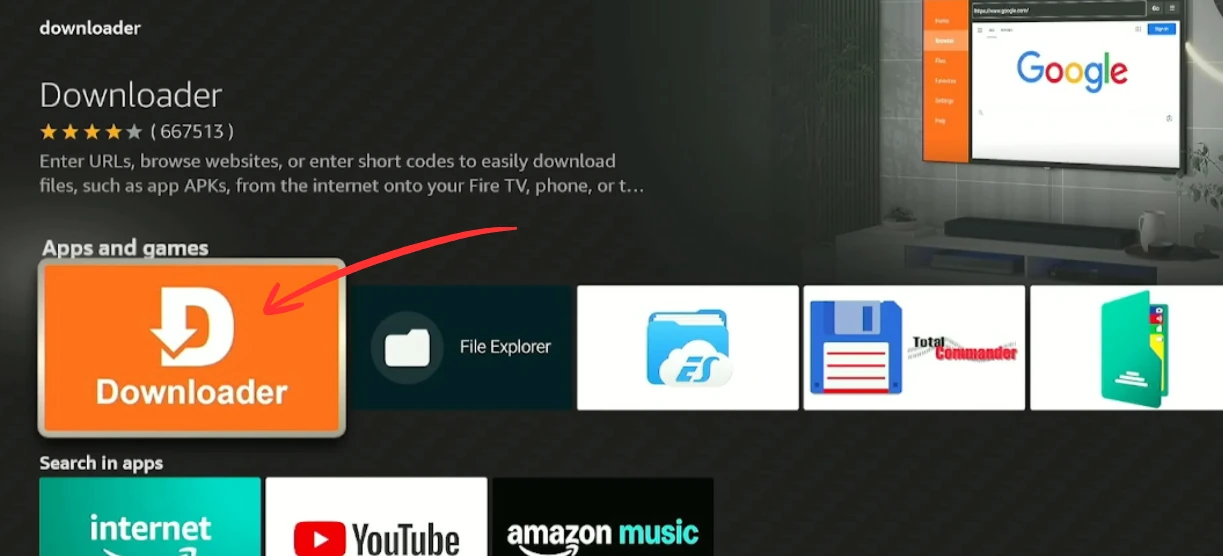
The code goes into the Downloader app — not into TiviMate, and not into your Fire Stick’s search bar. If you haven’t installed Downloader and switched on developer options yet, follow the full Fire Stick setup guide first; those one-time steps are what let the code work.
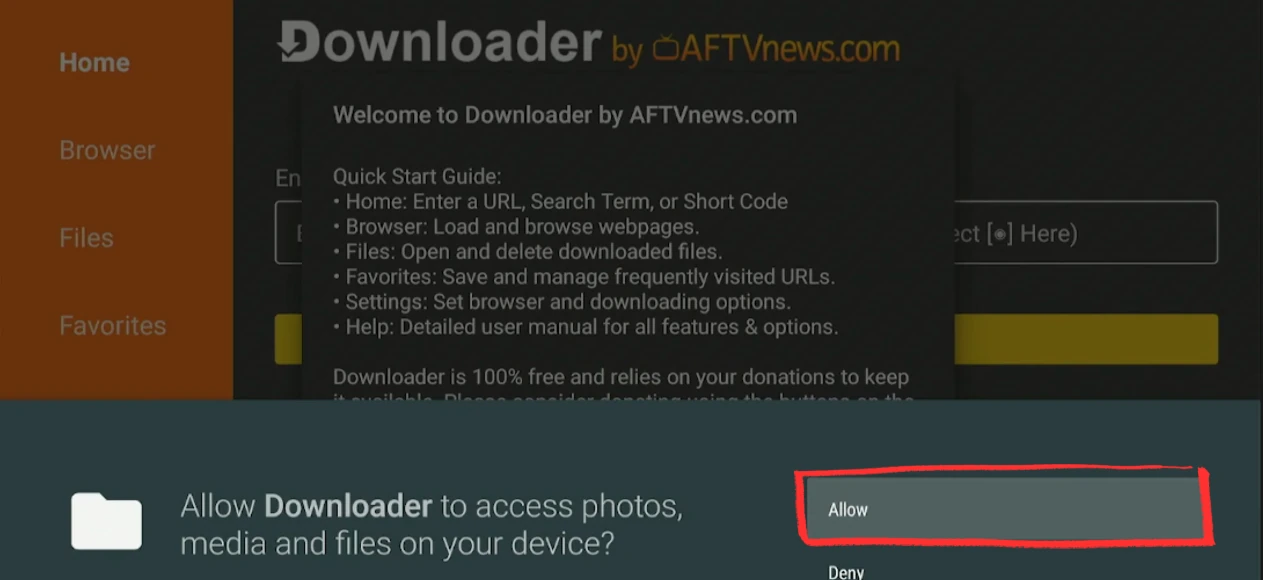
Open Downloader and allow access
Launch the Downloader app. If it asks for file access the first time, press Allow — without it, the APK can’t be saved.
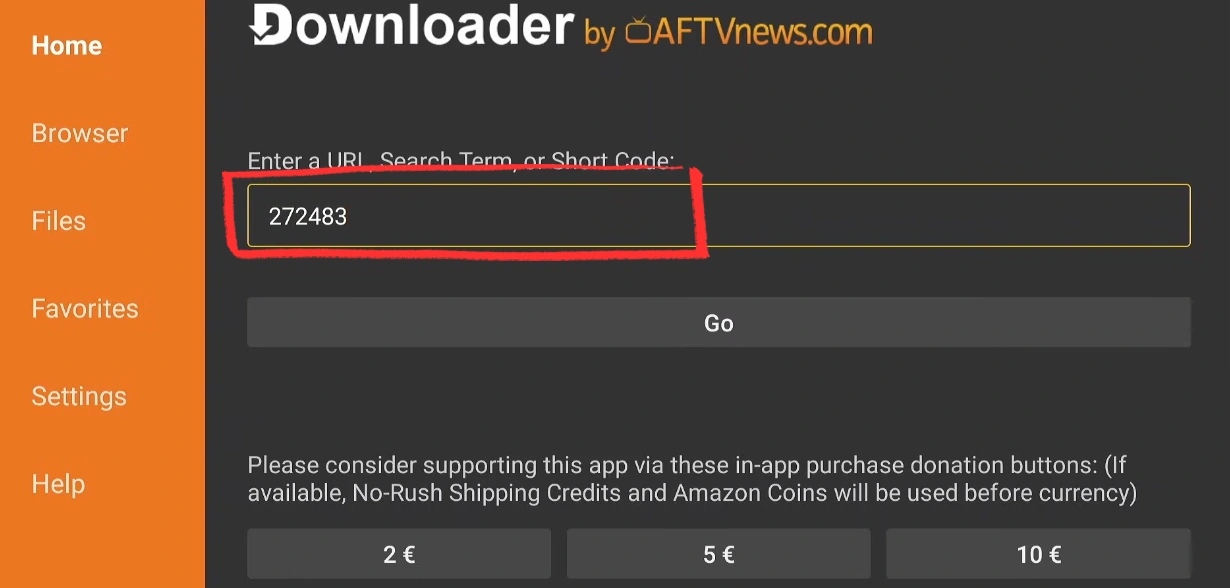
Type 272483 and press Go
Select the address field, enter 272483, and press Go. Downloader resolves the code and pulls the latest TiviMate APK automatically — usually 15 to 30 seconds.
Install TiviMate
When the download finishes, the installer opens. Accept the privacy prompt, press Install, then Open. TiviMate lands on its Add Playlist screen, ready for your IPTV credentials.
✓ Done. TiviMate is installed. Add your Xtream Codes or M3U playlist and you’re watching.
Does 272483 work on every device?
| Device | Code 272483? | Notes |
|---|---|---|
| Fire Stick / Fire TV | Yes | The main use case. Needs Downloader + developer options. |
| Android TV box | Yes | Only if TiviMate isn’t in your Play Store. Otherwise just install it directly. |
| Google TV / Chromecast | Yes | Sideload the same way — developer switch is worded slightly differently. |
| Android phone / tablet | Not needed | Install straight from Google Play — no code required. |
| Roku · Apple TV · iOS | No | These can’t run Android APKs at all. Downloader and the code don’t apply. |
Code 272483 not working? Fixes
The code won’t resolve
Type the full URL instead: https://tivimate.com/. Shortcodes occasionally rotate on Downloader’s side; the URL always points to the current APK.
Install is blocked
Downloader needs permission to install apps. Enable ADB Debugging, then allow Downloader under Install Unknown Apps in Developer Options first.
“Downloader not found”
The code only works inside the Downloader app. Install Downloader (by AFTVnews) from the Amazon or Google store, then enter 272483 there.
Download stalls at 0%
Check the Fire Stick’s internet, then retry. If it repeats, clear Downloader’s cache or restart the device and enter the code again.
Avoid “modded” codes. Some sites push alternative numbers that install cracked or repackaged TiviMate builds. Stick to 272483 or the official tivimate.com URL — anything else risks malware.
Downloader code FAQ
What is the TiviMate downloader code?
It’s 272483 — the official shortcode you enter in the Downloader app to fetch the TiviMate APK. It resolves to the same file as the URL https://tivimate.com/.
Does the code 272483 expire?
No. It has pointed to TiviMate for years and still works in 2026. If it ever stops resolving, the full URL https://tivimate.com/ is the permanent fallback.
Is using the downloader code safe?
Yes, when you use 272483 or the official URL — you’re downloading the developer’s own APK. The risk only appears with third-party “modded” codes that install tampered versions, so avoid those.
Do I need a computer to use the code?
No. The whole process runs on the Fire Stick or Android TV box itself through Downloader. No PC, ADB or cables involved.
What’s the code for Android TV boxes?
The same — 272483 — but only if TiviMate isn’t in your Play Store. Most Android TV boxes let you install TiviMate directly, in which case you don’t need the code at all.
Next steps

Full Fire Stick guide
Download and install TiviMate on any Fire Stick in about 13 minutes using Downloader code 272483, step-by-step with screenshots, playlist…

Android TV Box
Install TiviMate on any Android TV box, Nvidia Shield, Onn 4K, Mi Box, from the Play Store or by sideloading with code 272483. Step-by-step…

TiviMate Premium
TiviMate Premium (aka TiviMate Pro): what it unlocks, real 2026 prices ($9.99/yr or $33.99 lifetime) and how to buy the subscription, plus…